
N8n has become one of the most prominent AI workflow automation platforms today, attracting significant attention from the technology and business communities. With its powerful interactivity, flexible customization options, and reasonable pricing, N8n is a worthy ideal solution for those seeking a versatile, secure, and cost-effective workflow automation tool. This article will delve into an in-depth analysis of N8n , providing you with the most comprehensive overview of this tool, comparing N8n with Zapier , and guiding you on how to maximize N8n 's features to improve work efficiency in 2026.
n8n is not just a simple tool for automating routine tasks; it's also an open platform that allows you to build complex AI agents , suitable for businesses that want maximum control over their data and processes. In this article, we'll provide you with all the necessary information, from an overview of what n8n is , its core features, real-world experiences, to a detailed comparison with direct competitors like Zapier and Make (Integromat). We'll also help you understand n8n's self-hosted hosting models , analyze costs to optimize your budget, and highlight why n8n is currently the most reliable workflow automation tool .
Let's begin our journey exploring n8n together, and learn how to maximize its power in your daily work as well as in your long-term digital strategies.
Tool Overview
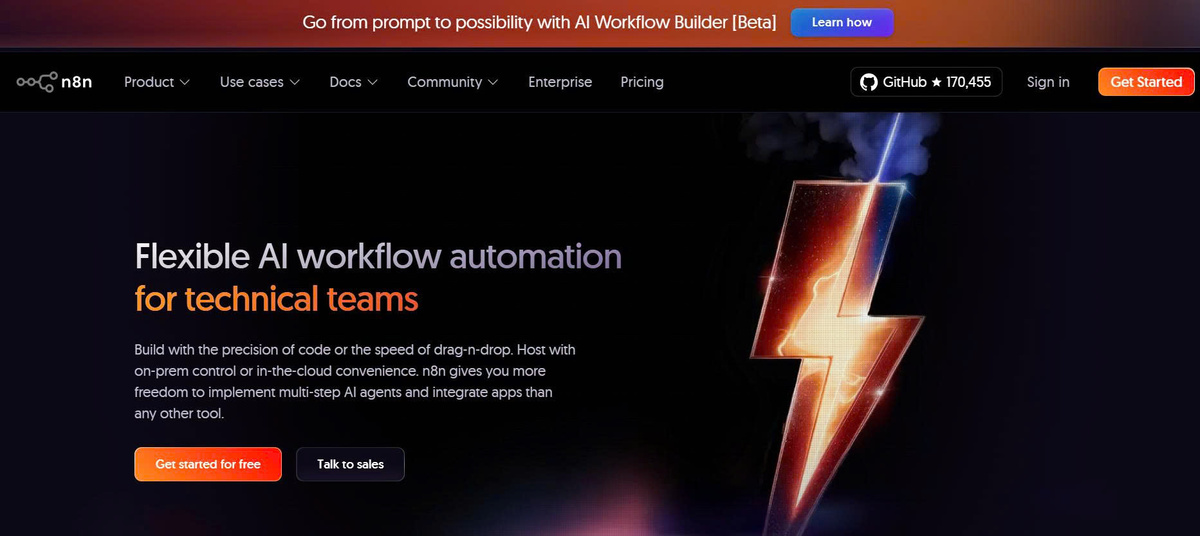
In this section, we will explore what n8n is and why it has become a new trend in workflow automation . This will lay a solid foundation for understanding the specific features and benefits of this tool, and identify the right target audience for using n8n in a business or personal environment.
What is n8n?
n8n (short for "node to node") is an open-source workflow automation platform (known as Fair-code) that allows users to design and customize automated processes without needing to write a lot of code or have in-depth programming knowledge. The platform is built on a node-based model , meaning tasks and their connections are displayed as "nodes" for easy manipulation and visualization of data flow.
The highlight of n8n is its extensive integration with over 400 different applications, from popular services like Google Sheets and Slack to AI models like OpenAI or LangChain. This allows users to create multi-step AI agents , intelligently process data, automatically send emails, update reports, or perform complex tasks on demand, all with simple drag-and-drop operations.
Unlike other paid platforms like Zapier or Make, n8n allows users to set up a completely free self-hosted system or use a cloud version. This means greater data control and security, making it suitable for organizations requiring on-premise data and optimizing operating costs.
The intended use of n8n
n8n was created to solve the problem of connecting separate software and applications, a major challenge in the automation process for businesses. In environments with mostly fragmented data, integrating different systems often encounters many difficulties and is time-consuming.
With its ability to build multi-step AI agents , n8n also helps developers and companies of all sizes design optimized automated processes, improving efficiency and minimizing the risk of errors caused by manual processes. Another strength is its high customizability, suitable for organizations of all sizes, from freelancers and startups to large enterprises requiring high data security and the most cost-effective operating costs.
Suitable customer segment
The primary target users of n8n include developers , IT engineers who want complete control over the source code, or organizations that want autonomy in data processing. Businesses with security requirements and those needing to store data on-premises rather than relying on third-party cloud services will find the self-hosted n8n platform particularly suitable .
Furthermore, individuals or agencies looking to save costs compared to tools like Zapier or Make will find n8n the most suitable option. With its open-source model, users can also customize it to their needs, expand automation capabilities, and develop complex AI agents to optimize operational processes.
Through this section, we've gained a clear understanding of what n8n is and its appropriate goal: to provide comprehensive workflow automation solutions. In the next section, we'll review the core features that make n8n a leading workflow automation tool today.
Core features
n8n 's strength lies in its diverse and flexible features, providing maximum support for automation processes, from simple to complex. Below are the highlights that clearly differentiate n8n from other platforms like Zapier and Make.
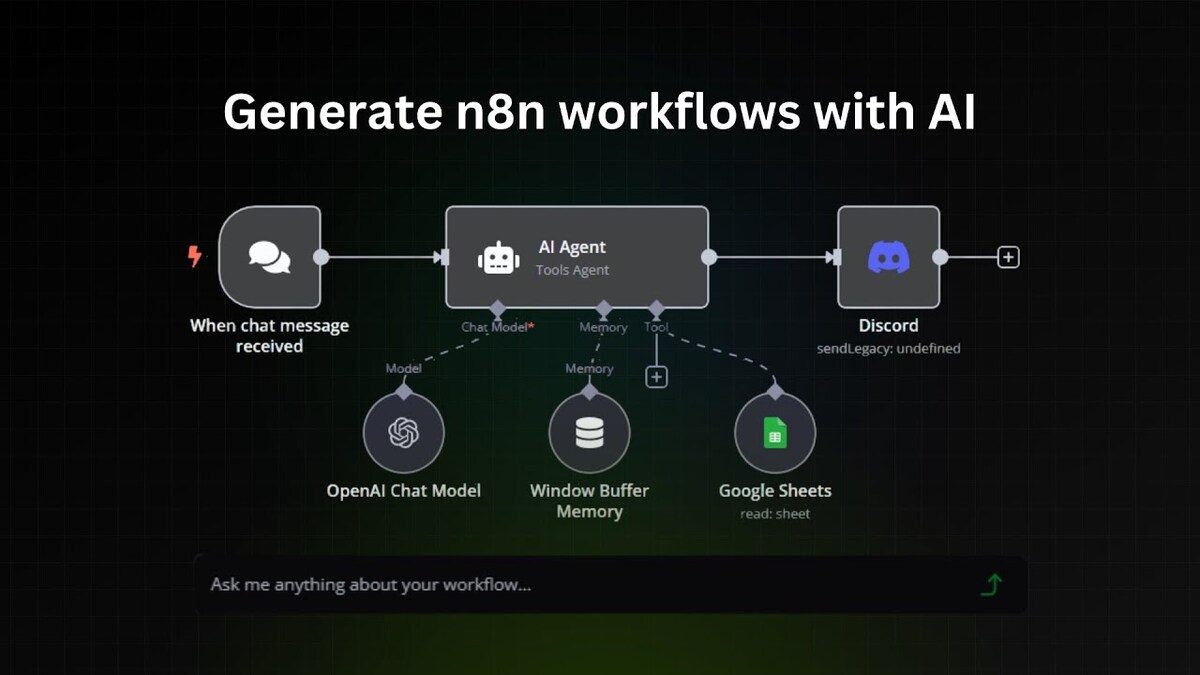
AI Workflow Builder (Beta): Create workflows with just a command.
One of the most notable features of n8n is its AI Workflow Builder, currently in Beta, which allows users to build automated workflows using only commands or prompts. Instead of dragging and dropping individual nodes, this new UI helps users focus on the idea, with the AI suggesting suitable nodes and how to link them.
This capability offers a fresh perspective, providing exceptional support for complex AI agents and making the development of intricate automated processes much easier. For innovators, developers, or beginners, this represents a significant leap forward in AI-based automation technology.
Instead of spending hours meticulously navigating each step, now you can simply enter commands, and the AI will suggest quick solutions, saving significant time and effort. This is also a major advantage of n8n in optimizing automated workflows, especially when integrating AI agents to handle large or complex data.
Flexible and versatile node integration.
With over 400 built-in nodes, n8n can easily connect to a multitude of popular services such as Google Workspace, Slack, Discord, OpenAI, LangChain, and many other APIs. Users can quickly create intelligent workflows , from automating email sending and data updates to coordinating AI models for analysis, prediction, or decision-making.
High customizability is n8n 's number one feature . You can directly insert JavaScript code into nodes to handle complex data, creating natural logic tailored to the specific needs of your workflow. This makes n8n limitless, suitable for both the general technical community and professional programmers.
The user-friendly, intuitive drag-and-drop interface makes it easy for users to visualize and design their processes in a clear and coherent manner. At the same time, the ability to freely build processes to suit specific requirements is a key strength that gives n8n an advantage in today's automation world.
Ability to intervene via Code & Hosting Options
A key feature of n8n is its ability to write code directly within Nodes, allowing developers to customize data or build complex logic that goes far beyond the limitations of UI drag-and-drop functionality. This is a significant advantage, especially when high data customization is required, or when developing AI agents capable of multi-step processing.
In terms of hosting, n8n offers two options: using a paid cloud service or setting up a completely free self-hosted system on your own server. This helps businesses ensure security and tight data control, suitable for industries with high legal and information security requirements. In addition, this model helps optimize operating costs, especially for small organizations or individuals.
With its customization capabilities, diverse features, and hosting flexibility, n8n is truly a comprehensive workflow automation tool , meeting the needs of everyone from individuals to large organizations. Next, we will explore its advantages and disadvantages step-by-step to understand its practical applications.
Real-life experience & reviews
To provide the most accurate assessment of n8n , we will delve into analyzing real-world experiences using this platform in various environments, from individuals and small groups to large-scale businesses requiring high security. Criteria such as user interface, output quality, processing speed, and advantages and disadvantages will give you the most intuitive, objective, and comprehensive perspective.
User Interface (UI/UX): Drag-and-drop editor
The n8n interface is designed on a canvas-based principle , making it intuitive and easy to use. Users drag nodes, connect them with wires, and build a coherent workflow, clearly visualizing the data flow from beginning to end. While initially, complete newcomers might feel overwhelmed by the many options, after a few focused attempts, they will find it much easier.
This interface is not only suitable for engineers or programmers, but also easily supports non-experts, which is a big plus for promoting automation in teams without in-depth programming knowledge. Features such as step-by-step debugging and data monitoring throughout the execution process help users tightly control the process and minimize errors.
Output quality & debugging capabilities
During testing, I found that n8n processed data quite accurately and quickly. In particular, its step-by-step debugging capability helped identify errors quickly, reducing repair time and optimizing the automated process.
n8n 's ability to handle large, complex data far surpasses many other platforms. In complex processes integrating multiple APIs and AI agents, I found that n8n can maintain fast processing speeds without excessive lag or delay, making it suitable even for large-scale enterprise automation requirements.
Furthermore, the ability to customize data using code allows developers to easily extend and optimize their processes in a more personalized way. Therefore, the output of n8n is always guaranteed to be accurate and meet the specified requirements.
Processing speed and scalability
The processing speed of n8n depends heavily on the hardware infrastructure or cloud environment you choose. In a self-hosted environment , you can optimize hardware and upgrade servers to achieve the best performance. In this case, the automated process can handle hundreds or thousands of tasks per minute, suitable for large-scale data processing demands.
In personal testing, I found the speed quite impressive, with almost no lag when executing workflows with dozens of nodes and integrating multiple APIs. This demonstrates that n8n is scalable enough and suitable for medium and large businesses that want to develop multi-step, continuous automation systems.
In addition, the reliable and supportive user community, along with detailed documentation, helps new users quickly master the platform. These real-world experiences have further strengthened confidence in n8n 's capabilities and reliability in the long term.
Comparison with competitors
To help you make the right decision, this section will compare n8n in detail with popular automation platforms such as Zapier and Make (Integromat). This will clarify its strengths, weaknesses, and suitability for specific user needs.
n8n vs Zapier: Ease of Use and Cost
Zapier stands out with its extremely user-friendly interface, suitable for non-experts or beginners in automation. However, this comes with limitations on the number of steps and tasks per month, and a relatively high cost when scaling up.
Meanwhile, n8n, while having a slightly more complex interface than the original, is more flexible and, importantly, is free or significantly less expensive. Self -hosted n8n users can have maximum control over processes and data, making it suitable for businesses with high security requirements.
n8n vs Make (Integromat): Interface and Extensibility
Make boasts an extremely attractive and user-friendly interface, suitable for new users. However, n8n excels in its customization capabilities, direct code writing, and self-hosted setup features, allowing businesses to maintain control over their data.
The key to n8n 's self-customization capabilities is its breakthrough, enabling organizations to develop AI agents that mimic complex workflows not easily implemented on other platforms.
Highlights and limitations of each platform
n8n offers advantages in terms of control, flexibility, customization, and cost-effectiveness, especially in environments requiring high data security. Conversely, Zapier is suitable for businesses with limited technical expertise and a need for quick setup.
Meanwhile, Make excels in its beautiful, user-friendly interface design, suitable for small teams, individuals, or non-technical groups who need to create complex automated processes. Therefore, the comparison should not only focus on features but also on the specific needs of each customer segment.
Pricing & Service Packages
In terms of cost , n8n has a clear advantage over its competitors by offering a completely free self-hosted version for users. This greatly benefits individuals, small teams, startups, or organizations that want to control their data and not rely on cloud services.
n8n service packages
n8n offers four flexible pricing plans: Starter, Pro, Business, and Enterprise , suitable for individuals, small teams, and large enterprises requiring powerful automation and high scalability. All plans include unlimited users, workflows, and integrations , with pricing based on the number of workflow executions per month , regardless of workflow complexity.
The Starter package (€24/month) is a suitable option for beginners and individuals experimenting with automation, offering 2,500 workflow executions per month , 5 concurrent executions, 1 shared project, and 50 AI Workflow Builder credits , enough to build basic automated processes. For real-world deployment needs, the Pro package (€60/month) is designed for solo builders and small teams, upgrading to 10,000 executions , 20 concurrent executions, 3 shared projects, admin privileges, workflow history, and the ability to search detailed executions.
For businesses requiring greater control, security, and performance, the Business package (€800/month) offers self-hosted support , 40,000 executions per month , SSO (SAML, LDAP), multiple work environments, Git-based version control, and system scalability, suitable for medium-sized organizations. At the highest level, the Enterprise package is a customized plan for large enterprises with flexible executions, 200+ concurrent executions , long-term log storage, external key integration, dedicated support with SLA , and invoice billing .
Additionally, n8n offers free trials for its Starter, Pro, and Business plans, along with an annual payment option that saves approximately 17% on costs , helping businesses optimize their budget for long-term automation implementation.
| Package | Starter | Pro | Business | Enterprise |
|---|---|---|---|---|
| Price | 24 euros/month | 60 euros / month | 800 € / month | Contact sales |
| Workflow executions / month | 2,500 | 10,000 | 40,000 | Customize |
| Unlimited steps / routine | Yes | Yes | Yes | Yes |
| Implementation method | Hosted by n8n | Hosted by n8n | Self-hosted | Hosted by n8n or Self-hosted |
| Free trial | Have | Have | Have | Are not |
| Shared projects | 1 | 3 | 6 | Unlimited |
| Concurrent executions | 5 | 20 | 30 | 200+ |
| AI Workflow Builder credits | 50 | 150 | Coming soon | 1,000 (cloud only) |
| Insights (log & analytics) | - | 7 days | 30 days | 365 days |
| admin roles | - | Have | Have | Have |
| Global sensors | - | Have | Have | Have |
| Workflow Bathroom | - | Have | Have | Have |
| Execution search | - | Have | Have | Have |
| SSO (SAML, LDAP) | - | - | Have | Have |
| Multiple network | - | - | Have | Have |
| Scaling options | - | - | Have | Have |
| Version control (Git) | - | - | Have | Have |
| External secrets integration | - | - | - | Have |
| Log streaming | - | - | - | Have |
| Extended data retention | - | - | - | Have |
| Dedicated support & SLA | - | - | - | Have |
| Invoice billing | - | - | - | Have |
| Support | Forum | Forum | Forum | Dedicated support |
Price assessment
For the same cost, n8n saves you thousands of dollars annually compared to Zapier thanks to its self-installation capabilities and no fees for large workflows. Additionally, you can flexibly scale by upgrading servers or switching to a cloud version when needed, suitable for all budgets.
Advice on making the right choice
For individuals or small groups, using the completely free self-hosted n8n is an ideal option. Meanwhile, large businesses that need stability, professional technical support, and security should consider suitable paid cloud packages.
Conclude
This article clearly demonstrates that n8n is currently one of the most flexible and powerful workflow automation tools available, especially in the trend of integrating AI agents to process complex, natural data. With its free self-hosted installation , large support community, and advanced features like AI Workflow Builder and extensible code capabilities, n8n is the optimal solution for organizations requiring data control, security, and cost savings.
If you're a beginner , it's recommended to start with the cloud version to familiarize yourself with the available templates and ease of setup. If you're a developer or agency , install the self-hosted version to take full advantage of advanced features, customization options, and security.
Start your automation journey today with n8n - to improve efficiency, minimize manual work, and foster creativity in every workflow! Sign up for a free trial of n8n at [ Registration Link ].